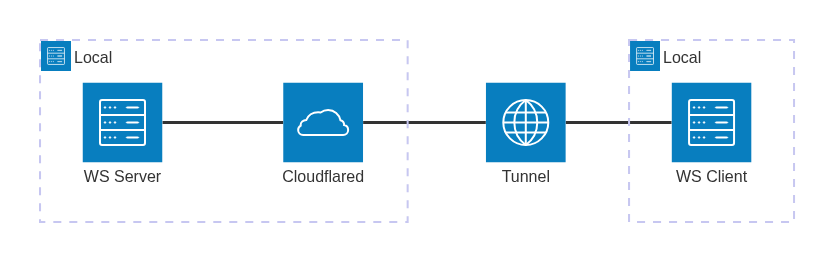
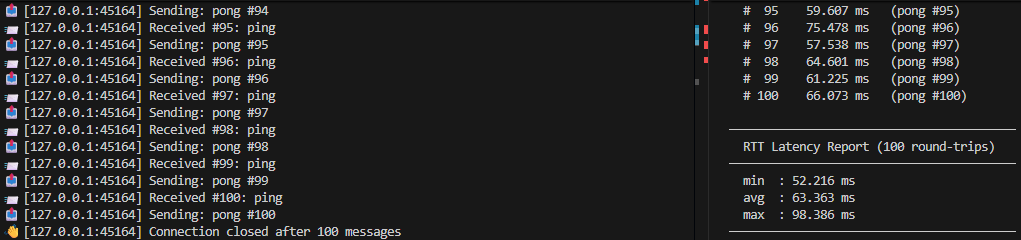
In this post, I will build a minimal ping-pong server and client in Rust using tokio-tungstenite, and use the client to measure real round-trip times across 100 exchanges (collecting min, avg, and max latency) using a Cloudflare Tunnel between them. I want to use this test for a future blog post where I will try to encapsulate other protocols in it.
Cloudflare Tunnel
a tool that exposes a locally running server to the internet without opening firewall ports or renting a VPS
tokio-tungstenite
A crate that is based on tungstenite-rs Rust WebSocket library and provides Tokio bindings and wrappers for it, so you can use it with non-blocking/asynchronous TcpStreams from and couple it together with other crates from Tokio stack.
Intro
In this post I want to test WebSocket connections over a real public network using Cloudflare Tunnel. Both the server and client are written in Rust using tokio-tungstenite and generated by Claude.
The end goal is to use this WebSocket connection as a transport layer for other protocols, but that’s a topic for a future post. For now, the focus of this blog post is getting a working ping-pong exchange over a tunnel and measuring the round-trip latency.
WebSocket server
The server binds to 0.0.0.0:8998 and listens for incoming TCP connections. For each new client, it spawns an independent Tokio task via tokio::spawn (multiple clients are handled concurrently).
Inside each task, accept_async upgrades the raw TCP stream into a WebSocket connection. The stream is then split into a writer and a reader, and the server enters a message loop. On every incoming text frame it increments a counter and responds: ping gets a pong #N reply, pong gets a ping #N reply, and anything else is echoed back. WebSocket-level Ping control frames are answered with Pong automatically, as the protocol requires. The loop exits cleanly on a Close frame or any send/receive error.
use std::net::SocketAddr;
use tokio::net::{TcpListener, TcpStream};
use tokio_tungstenite::{accept_async, tungstenite::Message};
use futures_util::{SinkExt, StreamExt};

const ADDR: &str = "0.0.0.0:8998";

#[tokio::main]
async fn main() {
    let listener = TcpListener::bind(ADDR).await.expect("Failed to bind");
    println!("🚀 WebSocket server listening on ws://{ADDR}");

    while let Ok((stream, addr)) = listener.accept().await {
        tokio::spawn(handle_connection(stream, addr));
    }
}

async fn handle_connection(stream: TcpStream, addr: SocketAddr) {
    println!("🔌 New connection from {addr}");

    let ws_stream = match accept_async(stream).await {
        Ok(ws) => ws,
        Err(e) => {
            eprintln!("❌ Handshake error from {addr}: {e}");
            return;
        }
    };

    let (mut write, mut read) = ws_stream.split();
    let mut msg_count: u64 = 0;

    while let Some(msg) = read.next().await {
        match msg {
            Ok(Message::Text(text)) => {
                msg_count += 1;
                println!("📨 [{addr}] Received #{msg_count}: {text}");

                let response = if text.trim() == "ping" {
                    format!("pong #{msg_count}")
                } else if text.trim().starts_with("pong") {
                    format!("ping #{msg_count}")
                } else {
                    format!("echo: {text}")
                };

                println!("📤 [{addr}] Sending: {response}");
                if let Err(e) = write.send(Message::Text(response.into())).await {
                    eprintln!("❌ Send error to {addr}: {e}");
                    break;
                }
            }
            Ok(Message::Close(_)) => {
                println!("👋 [{addr}] Connection closed after {msg_count} messages");
                break;
            }
            Ok(Message::Ping(data)) => {
                let _ = write.send(Message::Pong(data)).await;
            }
            Err(e) => {
                eprintln!("❌ Error from {addr}: {e}");
                break;
            }
            _ => {}
        }
    }
}
Create and Setting up Cloudflare Tunnel
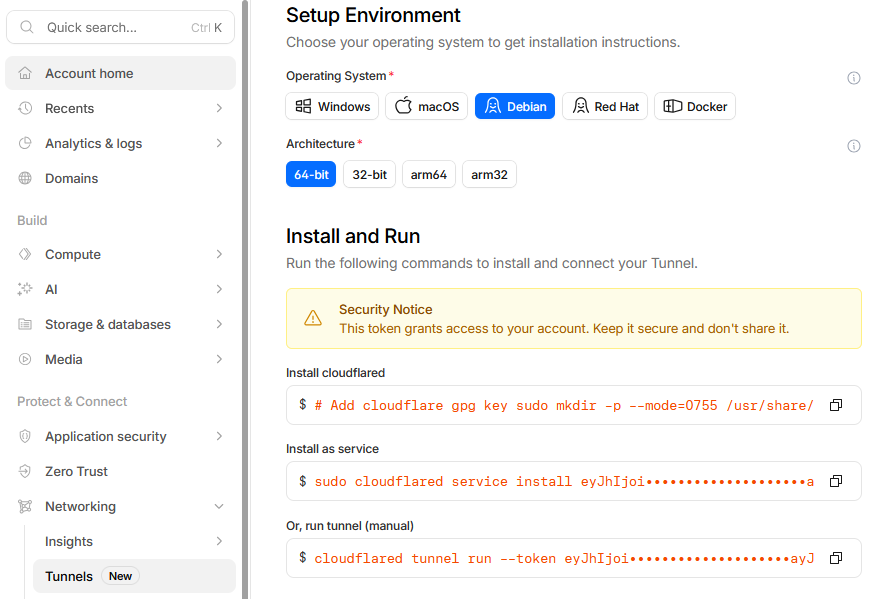
Install cloudflared on the machine or container where the ws-server will run. Cloudflare provides the exact installation commands in the dashboard, simply copy and run them as shown in the image below:
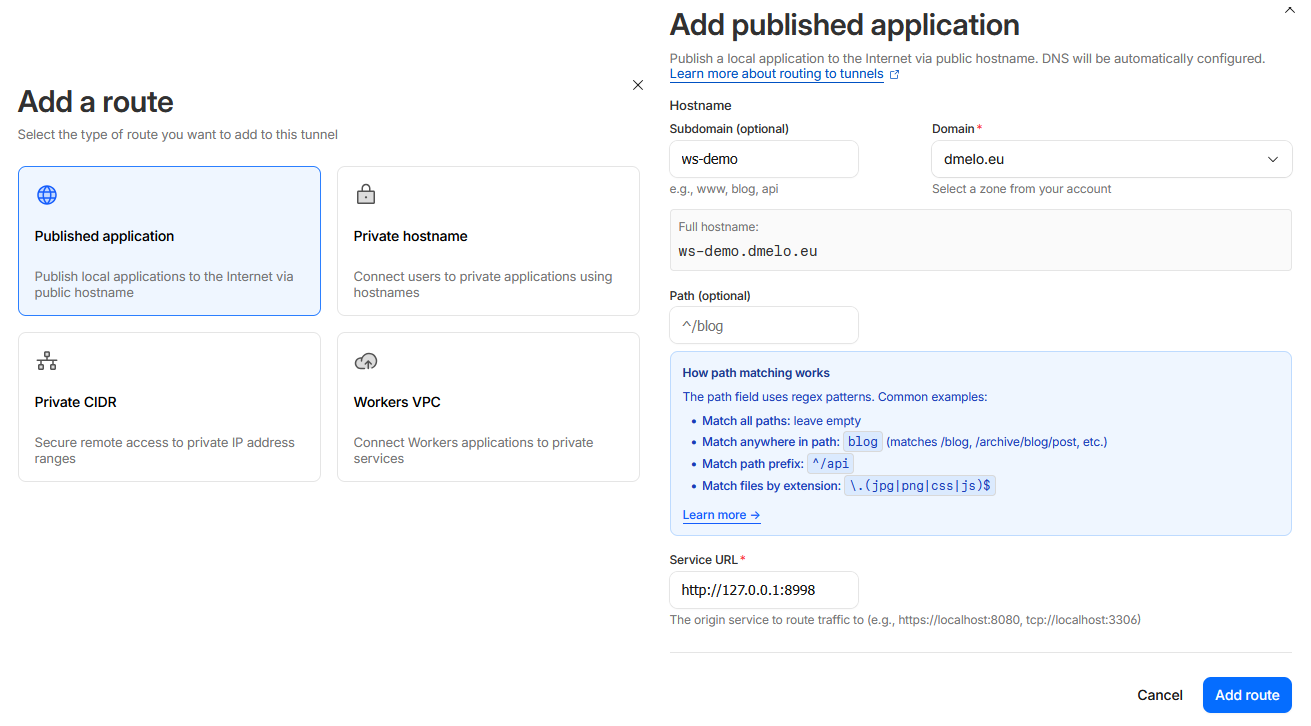
Create a route to tell Cloudflare Tunnel where your server is running and set the Service URL to http://127.0.0.1:8998. Don’t worry about it showing http:// rather than ws:// WebSocket connections are supported transparently. Choose a subdomain for your tunnel. This will become the public address for the Rust client to use in the next step.
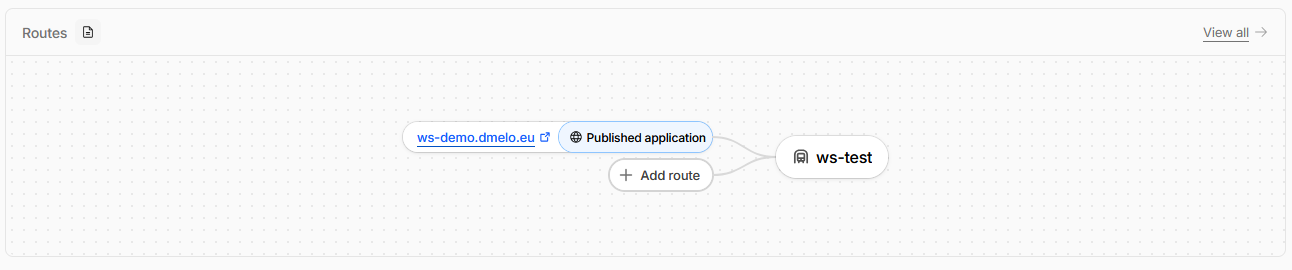
Final result:
WebSocket client
The client connects to ws://ws-demo.dmelo.eu, the public tunnel address created previously. It sends an initial ping, then as soon as a reply arrives it records the elapsed time, then replies immediately with the opposite message, and repeats, with the goal of measuring raw round-trip time.
A Stats struct accumulates every sample, tracking the total count, sum, min, and max in microseconds. After 100 exchanges it sends a Close frame and prints the final report with min, avg, and max in milliseconds.
use std::time::Instant;
use tokio_tungstenite::{connect_async, tungstenite::Message};
use futures_util::{SinkExt, StreamExt};

// const SERVER_URL: &str = "ws://127.0.0.1:8998";
const SERVER_URL: &str = "ws://ws-demo.dmelo.eu";
const PING_COUNT: u64 = 100;


struct Stats {
    count: u64,
    sum_us: u64,
    min_us: u64,
    max_us: u64,
}

impl Stats {
    fn new() -> Self {
        Self { count: 0, sum_us: 0, min_us: u64::MAX, max_us: 0 }
    }

    fn record(&mut self, elapsed_us: u64) {
        self.count += 1;
        self.sum_us += elapsed_us;
        self.min_us = self.min_us.min(elapsed_us);
        self.max_us = self.max_us.max(elapsed_us);
    }

    fn avg_us(&self) -> f64 {
        if self.count == 0 { 0.0 } else { self.sum_us as f64 / self.count as f64 }
    }

    fn print(&self) {
        println!("\n─────────────────────────────────────────");
        println!("  RTT Latency Report ({} round-trips)", self.count);
        println!("─────────────────────────────────────────");
        println!("  min  : {:.3} ms", self.min_us as f64 / 1000.0);
        println!("  avg  : {:.3} ms", self.avg_us() / 1000.0);
        println!("  max  : {:.3} ms", self.max_us as f64 / 1000.0);
        println!("─────────────────────────────────────────");
    }
}

#[tokio::main]
async fn main() {
    println!("🔗 Connecting to {SERVER_URL}...");

    let (ws_stream, _) = connect_async(SERVER_URL)
        .await
        .expect("Failed to connect. Is the server running?");

    println!("✅ Connected — sending {PING_COUNT} pings as fast as possible\n");

    let (mut write, mut read) = ws_stream.split();
    let mut stats = Stats::new();
    let mut sent_at = Instant::now();

    // Send first ping to kick things off
    sent_at = Instant::now();
    write
        .send(Message::Text("ping".into()))
        .await
        .expect("Failed to send initial ping");

    while let Some(msg) = read.next().await {
        match msg {
            Ok(Message::Text(text)) => {
                let rtt_us = sent_at.elapsed().as_micros() as u64;
                stats.record(rtt_us);

                println!(
                    "  #{:>4}  {:>8.3} ms   ({})",
                    stats.count,
                    rtt_us as f64 / 1000.0,
                    text.trim()
                );

                if stats.count >= PING_COUNT {
                    let _ = write.send(Message::Close(None)).await;
                    break;
                }

                // Reply immediately — no sleep — to measure raw RTT
                let reply = if text.starts_with("pong") { "ping" } else { "pong" };
                sent_at = Instant::now();
                if let Err(e) = write.send(Message::Text(reply.into())).await {
                    eprintln!("❌ Send error: {e}");
                    break;
                }
            }
            Ok(Message::Close(_)) => break,
            Ok(Message::Ping(data)) => { let _ = write.send(Message::Pong(data)).await; }
            Err(e) => { eprintln!("❌ Error: {e}"); break; }
            _ => {}
        }
    }

    stats.print();
}
Results
After 100 round-trips through the Cloudflare Tunnel, the RTT latency report came out as follows:
─────────────────────────────────────────
  RTT Latency Report (100 round-trips)
─────────────────────────────────────────
  min  : 52.216 ms
  avg  : 63.363 ms
  max  : 98.386 ms
─────────────────────────────────────────
The average round-trip of ~63 ms is reasonable for a connection routed through: local server → cloudflared → Cloudflare edge → public internet → client.