
esp32-net-dongle: Part 1
In this blog post, I will explain how I built a network dongle using the ESP32-C6 in Rust. The idea is simple: attach the board to any local network and get persistent remote access to any device on it from anywhere (no VPN, no port forwarding, no changes to the host machine) and get access to other network tools.
ESP32-C6 Network Dongle with Rust — Remote Access over WebSocket
I wanted a way to remotely access devices on my local network without setting up a VPN or opening firewall ports. The idea was to attach an ESP32-C6 to the network and have it connect outbound to a relay server, so I can tunnel SSH or run commands from anywhere.
In this post I will explain the project esp32-net-dongle that is a no_std Embassy firmware in Rust that connects to a WebSocket relay, forwards TCP tunnels, runs remote commands, and sends a heartbeat to keep the connection visible.
Embassy An async executor and HAL for embedded Rust, allowing efficient multitasking on microcontrollers without an OS.
no_std A Rust mode that removes the standard library dependency, required for bare-metal targets like the ESP32-C6 where there is no operating system.
How it works
The firmware boots, reads config from NVS flash, connects to Wi-Fi, then opens a persistent WebSocket to the relay server. The ESP32 bridges any device to the server, without needing to open an inbound port.
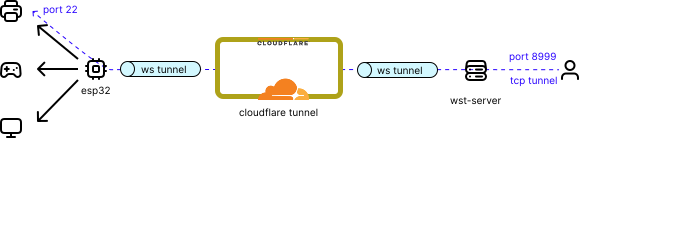
The diagram above shows how everything connects. The ESP32-C6 connects to the wst-server relay over WebSocket. The relay is not exposed directly to the internet — instead, cloudflared tunnels the connection through Cloudflare, making it reachable at a public subdomain like wst.dmelo.eu. From there, any client can reach the device without any open ports or firewall rules on the server side.
The server pushes TYPE_CMD frames to run commands or TYPE_OPEN frames to open a TCP tunnel. Results stream back as TYPE_CMD_OUTPUT or TYPE_DATA frames. A periodic heartbeat [HB] up=Xs heap=YB ip=a.b.c.d keeps the connection alive. The frame types and protocol details are covered in the next section.
Wire protocol
Every WebSocket binary frame has a fixed 5-byte header:
[1 byte type][4 bytes stream_id big-endian][N bytes payload]
| Constant | Value | Direction | Description |
|---|---|---|---|
TYPE_OPEN |
0x01 |
server → client | Open a TCP tunnel |
TYPE_DATA |
0x02 |
both | Tunnel payload |
TYPE_CLOSE |
0x03 |
both | Close a stream |
TYPE_LOG |
0x04 |
client → server | Heartbeat / log line |
TYPE_CMD |
0x05 |
server → client | JSON command request |
TYPE_CMD_OUTPUT |
0x06 |
client → server | JSON command response |
These are defined in crates/wst-proto, a zero-dependency no_std crate shared by the firmware, relay server, and desktop client.
Configuration
Config is resolved in priority order: NVS flash → compile-time env var → hardcoded default.
On every boot, the firmware waits a few seconds on USB-serial and offers a CLI:
[WST] Press any key to enter config CLI...

=== WST Config CLI ===
Commands: set <key> <val> | get <key> | show | reset | exit

> set wifi_ssid MyNetwork
> set wifi_pass supersecret
> set server_host wst.dmelo.eu
> set server_token mysecret
> exit
Values are saved to a single 4 KB flash sector at 0x3F0000 (magic WST\x01) and survive reflashing. Only four keys are required for a working connection: wifi_ssid, wifi_pass, server_host, and server_token.
Alternatively, you can bake config in at compile time via a .env file:
WIFI_SSID=MyNetwork
WIFI_PASS=supersecret
SERVER_HOST=wst.dmelo.eu
SERVER_TOKEN=mysecret
Remote commands
The firmware handles four commands over TYPE_CMD frames, all implemented with embassy-net:
| Command | Syntax | Description |
|---|---|---|
ping |
ping <ip> |
ICMP echo via embassy-net |
port_scan |
port_scan <ip:port> |
TCP connect probe |
wol |
wol <12-hex-digits> |
Wake-on-LAN magic packet |
uptime |
uptime |
Device uptime in seconds |
Exposing the relay server with Cloudflare Tunnel
The wst-server needs to be reachable by the ESP32 and any client, but I don’t want to open a port on my router or expose it directly to the internet. I covered Cloudflare Tunnels in a previous post this is the same setup applied here.
Cloudflare Tunnel A tool that exposes a locally running server to the internet without opening firewall ports or renting a VPS. WebSocket connections are supported transparently.
The wst-server listens on 0.0.0.0:8997. The tunnel points to that port and exposes it under a subdomain, for example wst.dmelo.eu.
Setting it up:
-
Install
cloudflaredon the machine runningwst-server. Cloudflare provides the exact installation commands in the dashboard. -
Create a route with the Service URL set to
http://127.0.0.1:8997. Even though it showshttp://, WebSocket connections are handled transparently. -
Set the subdomain (e.g.
wst.dmelo.eu). This becomes theSERVER_HOSTvalue in the firmware config.
Once the tunnel is running, the updated connection flow looks like this:
[ESP32-C6] ←ws:// wst.dmelo.eu→ [Cloudflare] ←→ [cloudflared] ←→ [wst-server :8997]
The firmware config changes to point at the public subdomain instead of a raw IP:
> set server_host wst.dmelo.eu
> set server_port 80
With this you don’t need firewall rules, no port forwarding, no VPS. The relay server runs on my home machine and is reachable from anywhere.
Build & Flash
The toolchain is pinned via rust-toolchain.toml. With probe-rs installed and an ESP32-C6 connected:
cargo build --release
probe-rs run --chip esp32c6 target\riscv32imac-unknown-none-elf\debug\esp32-net-dongle
To run the relay server:
cd crates/wst-server
cargo run -- --token mysecret --http-bind 0.0.0.0:8080 --ws-bind 0.0.0.0:8997
The server handles up to 64 simultaneous WebSocket clients and exposes a management HTTP UI showing connected devices, open tunnels, and command history.
You can find the full workspace: firmware, relay server, desktop client, and shared protocol crate at GitHub
