1
2
3
4
5
6
7
8
9
10
11
12
13
14
15
16
17
18
19
20
21
22
23
24
25
26
27
28
29
30
31
32
33
34
35
36
37
38
39
40
41
42
43
44
45
46
47
48
49
50
51
52
53
54
55
56
57
58
59
60
61
62
63
64
65
66
67
68
69
70
71
72
73
74
75
76
77
78
79
80
81
82
83
84
85
86
87
88
89
90
91
92
93
94
95
96
97
98
99
100
101
102
103
104
105
106
107
108
109
110
111
112
113
114
115
116
117
118
119
120
121
122
123
124
125
126
127
128
129
130
131
132
133
134
135
136
137
138
139
140
141
142
143
144
145
146
147
148
149
150
151
152
153
154
155
156
157
158
159
160
161
162
163
164
165
166
167
168
169
170
171
172
173
174
175
176
177
178
179
180
181
182
183
184
185
186
187
188
189
190
191
192
193
194
195
196
197
198
199
200
201
202
203
204
205
206
207
208
209
210
211
212
213
214
215
216
217
218
219
220
221
222
223
224
225
226
227
228
229
230
231
232
233
234
235
236
237
238
239
240
241
242
243
244
245
246
247
248
249
250
251
252
253
254
255
256
257
258
259
260
261
262
263
264
265
266
267
|
#!/usr/bin/env python3
import os
import time
import subprocess
from ctypes import *

os.environ["SDL_VIDEODRIVER"] = "kmsdrm"
os.environ["SDL_KMSDRM_DEVICE_INDEX"] = "0"
os.environ["SDL_RENDER_DRIVER"] = "software"

SDL = CDLL("libSDL2-2.0.so.0")

# ---------- Constants ----------
SDL_INIT_VIDEO    = 0x00000020
SDL_INIT_JOYSTICK = 0x00000200

SDL_WINDOW_FULLSCREEN = 0x00000001
SDL_WINDOW_SHOWN      = 0x00000004
SDL_WINDOWPOS_UNDEFINED = 0x1FFF0000

SDL_QUIT          = 0x100
SDL_JOYBUTTONDOWN = 0x603

# Buttons
BTN_A, BTN_B, BTN_X, BTN_Y = 0, 1, 2, 3
BTN_SELECT, BTN_START = 8, 9
BTN_UP, BTN_DOWN, BTN_LEFT, BTN_RIGHT = 13, 14, 15, 16

# ---------- Structures ----------
class SDL_Rect(Structure):
    _fields_ = [("x", c_int), ("y", c_int), ("w", c_int), ("h", c_int)]

class SDL_JoyButtonEvent(Structure):
    _fields_ = [
        ("type", c_uint32), ("timestamp", c_uint32),
        ("which", c_int32), ("button", c_uint8),
        ("state", c_uint8), ("padding1", c_uint8), ("padding2", c_uint8),
    ]

class SDL_Event(Union):
    _fields_ = [
        ("type", c_uint32),
        ("jbutton", SDL_JoyButtonEvent),
        ("padding", c_uint8 * 56),
    ]

# ---------- Prototypes ----------
SDL.SDL_Init.argtypes = [c_uint]; SDL.SDL_Init.restype = c_int
SDL.SDL_GetError.restype = c_char_p
SDL.SDL_CreateWindow.argtypes = [c_char_p, c_int, c_int, c_int, c_int, c_uint]
SDL.SDL_CreateWindow.restype = c_void_p
SDL.SDL_CreateRenderer.argtypes = [c_void_p, c_int, c_uint]
SDL.SDL_CreateRenderer.restype = c_void_p
SDL.SDL_SetRenderDrawColor.argtypes = [c_void_p, c_ubyte, c_ubyte, c_ubyte, c_ubyte]
SDL.SDL_RenderClear.argtypes = [c_void_p]
SDL.SDL_RenderPresent.argtypes = [c_void_p]
SDL.SDL_RenderFillRect.argtypes = [c_void_p, POINTER(SDL_Rect)]
SDL.SDL_PollEvent.argtypes = [POINTER(SDL_Event)]; SDL.SDL_PollEvent.restype = c_int
SDL.SDL_NumJoysticks.restype = c_int
SDL.SDL_JoystickOpen.argtypes = [c_int]; SDL.SDL_JoystickOpen.restype = c_void_p
SDL.SDL_Quit.argtypes = []

def must(ptr, name):
    if not ptr:
        print(f"{name} failed: {SDL.SDL_GetError().decode()}")
        exit(1)

# ---------- Very small 5x7 bitmap font (only the chars we need) ----------
# Each character is 5 bytes (columns), bits from top to bottom
FONT = {
    ' ': [0x00,0x00,0x00,0x00,0x00],
    'A': [0x7C,0x12,0x11,0x12,0x7C],
    'B': [0x7F,0x49,0x49,0x49,0x36],
    'C': [0x3E,0x41,0x41,0x41,0x22],
    'D': [0x7F,0x41,0x41,0x22,0x1C],
    'E': [0x7F,0x49,0x49,0x49,0x41],
    'F': [0x7F,0x09,0x09,0x09,0x01],
    'G': [0x3E,0x41,0x49,0x49,0x7A],
    'H': [0x7F,0x08,0x08,0x08,0x7F],
    'I': [0x00,0x41,0x7F,0x41,0x00],
    'J': [0x20,0x40,0x41,0x3F,0x01],
    'K': [0x7F,0x08,0x14,0x22,0x41],
    'L': [0x7F,0x40,0x40,0x40,0x40],
    'M': [0x7F,0x02,0x0C,0x02,0x7F],
    'N': [0x7F,0x04,0x08,0x10,0x7F],
    'O': [0x3E,0x41,0x41,0x41,0x3E],
    'P': [0x7F,0x09,0x09,0x09,0x06],
    'Q': [0x3E,0x41,0x51,0x21,0x5E],
    'R': [0x7F,0x09,0x19,0x29,0x46],
    'S': [0x46,0x49,0x49,0x49,0x31],
    'T': [0x01,0x01,0x7F,0x01,0x01],
    'U': [0x3F,0x40,0x40,0x40,0x3F],
    'V': [0x1F,0x20,0x40,0x20,0x1F],
    'W': [0x3F,0x40,0x38,0x40,0x3F],
    'X': [0x63,0x14,0x08,0x14,0x63],
    'Y': [0x07,0x08,0x70,0x08,0x07],
    'Z': [0x61,0x51,0x49,0x45,0x43],
    '0': [0x3E,0x51,0x49,0x45,0x3E],
    '1': [0x00,0x42,0x7F,0x40,0x00],
    '2': [0x42,0x61,0x51,0x49,0x46],
    '3': [0x21,0x41,0x45,0x4B,0x31],
    '4': [0x18,0x14,0x12,0x7F,0x10],
    '5': [0x27,0x45,0x45,0x45,0x39],
    '6': [0x3C,0x4A,0x49,0x49,0x30],
    '7': [0x01,0x71,0x09,0x05,0x03],
    '8': [0x36,0x49,0x49,0x49,0x36],
    '9': [0x06,0x49,0x49,0x29,0x1E],
    ':': [0x00,0x36,0x36,0x00,0x00],
    '.': [0x00,0x60,0x60,0x00,0x00],
    ',': [0x00,0x80,0x60,0x00,0x00],
    '-': [0x08,0x08,0x08,0x08,0x08],
    '/': [0x20,0x10,0x08,0x04,0x02],
    '(': [0x1C,0x22,0x41,0x00,0x00],
    ')': [0x00,0x00,0x41,0x22,0x1C],
    '[': [0x7F,0x41,0x41,0x00,0x00],
    ']': [0x00,0x00,0x41,0x41,0x7F],
    '!': [0x00,0x00,0x5F,0x00,0x00],
    '?': [0x02,0x01,0x51,0x09,0x06],
    '%': [0x23,0x13,0x08,0x64,0x62],
    '+': [0x08,0x08,0x3E,0x08,0x08],
    '=': [0x14,0x14,0x14,0x14,0x14],
    '_': [0x40,0x40,0x40,0x40,0x40],
    '°': [0x06,0x09,0x09,0x06,0x00],
}

def draw_char(ren, x, y, char, scale=3, color=(255,255,255)):
    char = char.upper()
    data = FONT.get(char, FONT[' '])
    r, g, b = color
    SDL.SDL_SetRenderDrawColor(ren, r, g, b, 255)
    for col, bits in enumerate(data):
        for row in range(7):
            if bits & (1 << row):
                rect = SDL_Rect(x + col*scale, y + row*scale, scale, scale)
                SDL.SDL_RenderFillRect(ren, byref(rect))

def draw_text(ren, x, y, text, scale=3, color=(255,255,255)):
    for i, ch in enumerate(text):
        draw_char(ren, x + i*(5*scale + scale), y, ch, scale, color)

def fill_rect(ren, x, y, w, h, color):
    r, g, b = color
    SDL.SDL_SetRenderDrawColor(ren, r, g, b, 255)
    rect = SDL_Rect(x, y, w, h)
    SDL.SDL_RenderFillRect(ren, byref(rect))

def run_cmd(cmd):
    try:
        return subprocess.check_output(cmd, shell=True, stderr=subprocess.DEVNULL).decode().strip()
    except:
        return "N/A"

# ---------- Menu data ----------
menu_items = [
    "SYSTEM INFO",
    "TEST RED",
    "TEST GREEN",
    "TEST BLUE",
    "EXIT",
]
selected = 0
mode = "menu"          # "menu" or "info"
info_lines = []

def build_system_info():
    global info_lines
    info_lines = []
    info_lines.append("SYSTEM INFORMATION")
    info_lines.append("")
    info_lines.append(f"KERNEL  {run_cmd('uname -r')}")
    info_lines.append(f"ARCH    {run_cmd('uname -m')}")
    info_lines.append(f"UPTIME  {run_cmd('uptime -p')}")
    info_lines.append("")
    cpu = run_cmd("cat /proc/cpuinfo | grep 'model name' | head -1 | cut -d: -f2").strip()
    info_lines.append(f"CPU     {cpu[:28]}")
    info_lines.append(f"CORES   {run_cmd('nproc')}")
    mem = run_cmd("free -h | awk '/Mem:/ {print $2\" total\"}'")
    info_lines.append(f"MEMORY  {mem}")
    info_lines.append("")
    root = run_cmd("df -h / | tail -1 | awk '{print $4\" free\"}'")
    info_lines.append(f"ROOT    {root}")
    temp = run_cmd("cat /sys/class/thermal/thermal_zone0/temp 2>/dev/null")
    if temp.isdigit():
        info_lines.append(f"TEMP    {int(temp)/1000:.1f} C")
    else:
        info_lines.append("TEMP    N/A")
    info_lines.append("")
    info_lines.append("PRESS ANY BUTTON")

# ---------- Main ----------
if SDL.SDL_Init(SDL_INIT_VIDEO | SDL_INIT_JOYSTICK) != 0:
    print("SDL_Init failed:", SDL.SDL_GetError().decode())
    exit(1)

win = SDL.SDL_CreateWindow(b"Menu", SDL_WINDOWPOS_UNDEFINED, SDL_WINDOWPOS_UNDEFINED,
                           720, 720, SDL_WINDOW_FULLSCREEN | SDL_WINDOW_SHOWN)
must(win, "CreateWindow")

ren = SDL.SDL_CreateRenderer(win, -1, 0)
must(ren, "CreateRenderer")

if SDL.SDL_NumJoysticks() > 0:
    SDL.SDL_JoystickOpen(0)

running = True
event = SDL_Event()

while running:
    while SDL.SDL_PollEvent(byref(event)):
        if event.type == SDL_QUIT:
            running = False
        elif event.type == SDL_JOYBUTTONDOWN:
            btn = event.jbutton.button

            if mode == "info":
                mode = "menu"
                continue

            if btn == BTN_UP:
                selected = (selected - 1) % len(menu_items)
            elif btn == BTN_DOWN:
                selected = (selected + 1) % len(menu_items)
            elif btn == BTN_A:
                if selected == 0:
                    build_system_info()
                    mode = "info"
                elif selected == 1:  # Red
                    fill_rect(ren, 0, 0, 720, 720, (255, 0, 0))
                    SDL.SDL_RenderPresent(ren)
                    time.sleep(1.2)
                elif selected == 2:  # Green
                    fill_rect(ren, 0, 0, 720, 720, (0, 220, 0))
                    SDL.SDL_RenderPresent(ren)
                    time.sleep(1.2)
                elif selected == 3:  # Blue
                    fill_rect(ren, 0, 0, 720, 720, (0, 80, 255))
                    SDL.SDL_RenderPresent(ren)
                    time.sleep(1.2)
                elif selected == 4:
                    running = False
            elif btn in (BTN_B, BTN_START):
                running = False

    # ----- Draw -----
    fill_rect(ren, 0, 0, 720, 720, (15, 15, 30))   # dark background

    if mode == "menu":
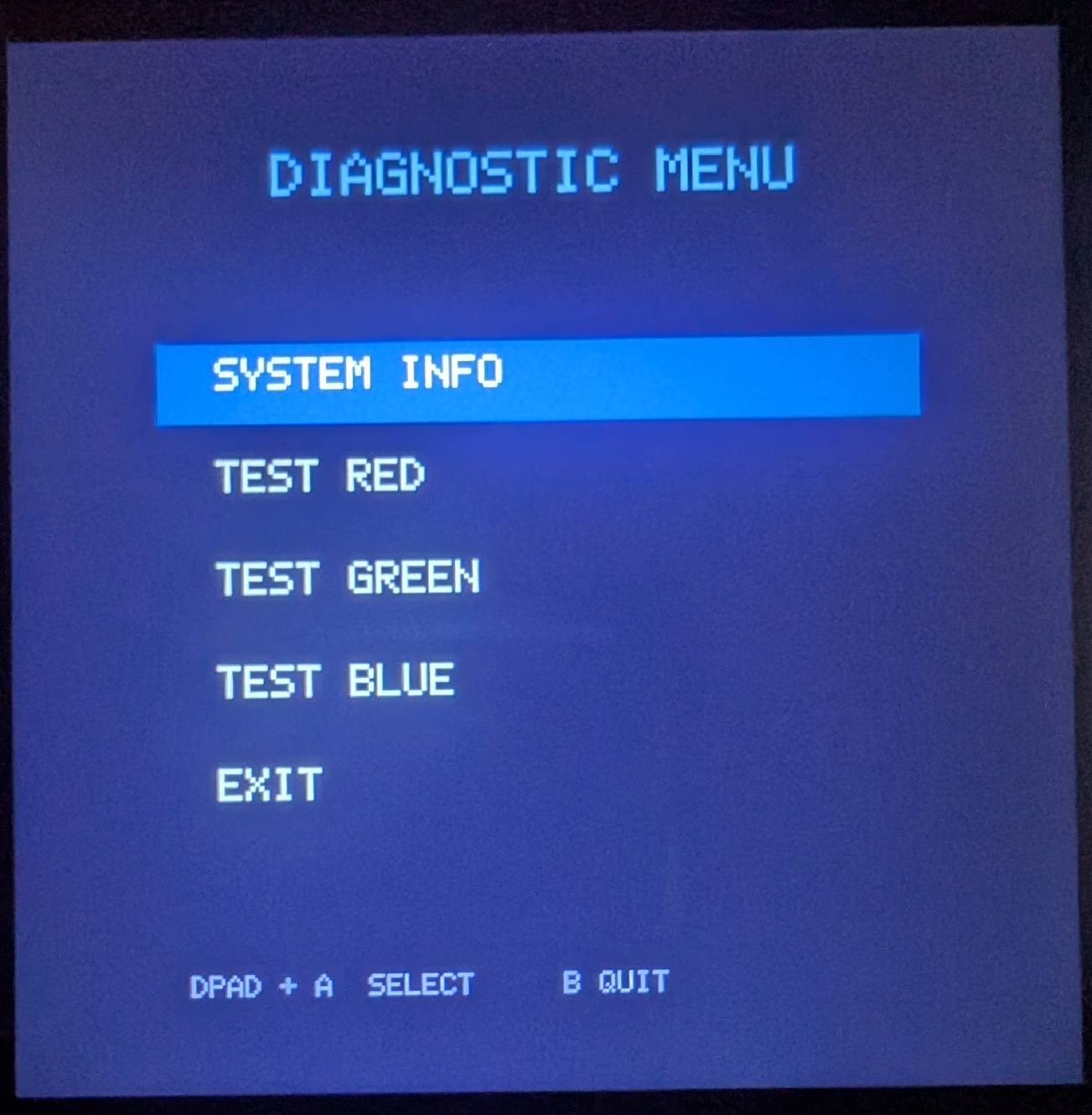
        draw_text(ren, 180, 80, "DIAGNOSTIC MENU", scale=4, color=(120, 180, 255))

        for i, item in enumerate(menu_items):
            y = 220 + i * 70
            if i == selected:
                fill_rect(ren, 100, y - 10, 520, 55, (40, 90, 180))
                draw_text(ren, 140, y, item, scale=3, color=(255, 255, 255))
            else:
                draw_text(ren, 140, y, item, scale=3, color=(180, 180, 180))

        draw_text(ren, 120, 640, "DPAD + A  SELECT     B QUIT", scale=2, color=(100, 100, 140))

    else:  # info screen
        for i, line in enumerate(info_lines):
            draw_text(ren, 60, 60 + i * 38, line, scale=2, color=(220, 220, 220))

    SDL.SDL_RenderPresent(ren)
    time.sleep(0.01)

SDL.SDL_Quit()
|